The 1.3 release has been a long time in the making and there are still some details to flesh out. But those are mostly about reducing the config options and tweaking a few small details, so I’m providing this feature preview release for people to try out the new code and provide feedback. The plan is for this to become 1.3 as-is, just with the aforementioned cleanups.
This release brings two major improvements, the Timing rework and Sepoint smoothing. There’s also the (firmware 6.06+ only) feature of normalizing the tunes via the motor torque constant (calculated from the Flux Linkage motor config value).
Overall, this version introduces a number of improvements that cause small changes in behavior. Realizing this can be disruptive, I’ve tried to bundle all of them into one release to reduce the inconvenience as much as possible.
Timing rework
I’ve written a lengthy post about the details of these improvements. Short story of these changes is:
- The improved timing results in better vibration rejection and potentially improvements in behavior in high-vibration situations.
- More consistent tune behavior across different configurations and boards.
- As a consequence, the tunes will behave slightly differently. The most significant difference is in correcting the angling speeds for the tilts and pushbacks (they’ll differ by 9-17% depending on setup). However, due to the introduction of better smoothing, the increased speeds should blend in, the smoothing should have more impact than that.
- The Refloat Cfg → Specs → Loop Hertz option will now be removed. It’s only being kept in the feature preview for potential experimentation.
Setpoint smoothing
The core Setpoint smoothing algorithm is the 3-Stage algorithm from the old implementation. The config options have been updated to be more user-friendly, but three options remain:
- Smoothing Time Constant
- Smoothing On Speed Time Constant
- Smoothing Off Speed Time Constant
The first option represents the time in seconds it takes for the setpoint value to reach approximately 66% of its new target, if the other two options (On/Off Speed Time Constants) were 0. So just think of it as the smoothing delay, typically set to something like 0.2-0.3s. This can (by nature of the filter) still be too harsh and so the other two options come into play. They also define the time to reach 66% of the target value, but for the speed of the transition, meaning how fast the value is changing. No need to think too hard about that, just know they are not of the same scale as the Smoothing Time Constant, but they are of the same scale between themselves. What’s the difference between them then? They correspond to the two Tiltback Speeds: Smoothing On Speed Time Constant corresponds to Max Tiltback Speed and Smoothing Off Speed Time Constant corresponds to Max Tiltback Release Speed. So, if we consider e.g. uphill ATR, setting a high On Speed Time Constant will slow down the nose going up, a high Off Speed Time Constant will slow down the nose going down.
Note the defaults prioritize slower On Speeds and faster Off Speeds. At least one of them needs to be slow for a smooth ride and slower On Speed seems more comfortable for casual riding. Racers might want to tweak these.
The options are added for Torque Tilt, ATR, Turn Tilt and Remote in the feature preview. Brake Tilt uses the ATR values. Note the defaults for these values are not necessarily optimal, the goal of the feature preview is to gather feedback and fine-tune them. For Turn Tilt and Remote the smoothing should likely be hard-coded and the options removed.
For ATR, the Response Boost option has been removed due to being deemed no longer necessary and the Transition Boost option has been reworked. Due to it having a different effect now, it was intentionally changed so that it won’t transfer from backups. A default value of 2.0x will be set in all 1.3 tunes.
Tune normalization via Flux Linkage
On firmware 6.06+ the package has access to the motor Flux Linkage value. This value expresses the torque capability of the motor (technically torque constant, Kt, inverse of the speed constant, Kv). Refloat 1.3 will compensate for this (effectively use the value to internally convert all currents to torque). This means tunes will slightly change in their torque output depending on how much the motor Flux Linkage differs from the reference value of 27 mWb.
Measuring and tweaking the control loop timing
There are now two more realtime data values available in the realtime data plot in package UI: Control Loop dt and Control Loop Frequency
They are both defined by the IMU Sample Rate. In an ideal world Control Loop Frequency would be equal to the Sample Rate, but it ends up being a bit different depending on circumstances. It is heavily impacted by the Motor Zero Vector Frequency, which puts a significant load on the controller. ZVF only has an impact when the board is engaged (or more broadly when the motor current modulation is on).
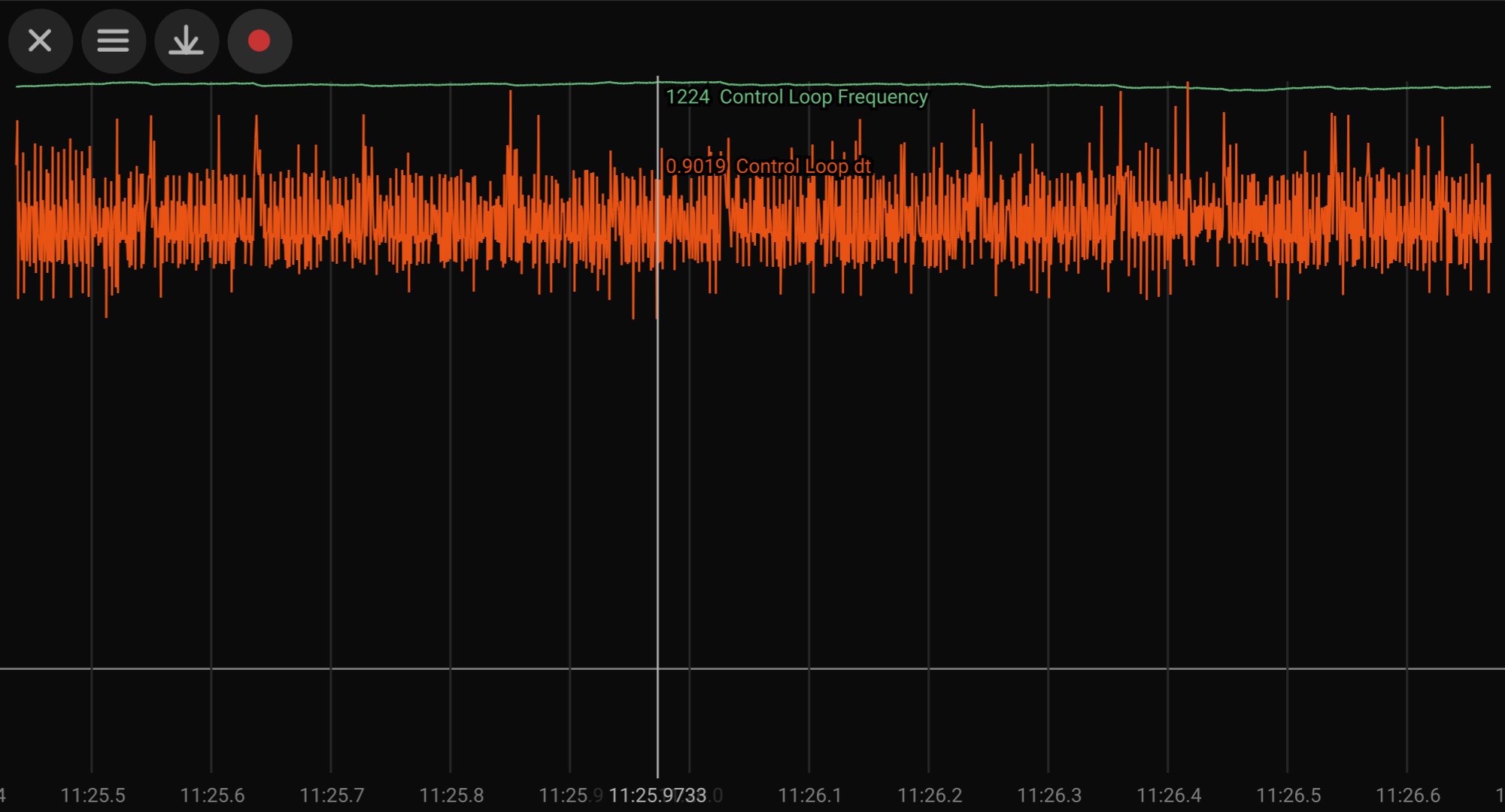
The Control Loop dt is the time between control loop iterations. For viewing it the Data Recording firmware is necessary, regular realtime data which are logged around 10x per second cannot accurately capture it. The Data Recording plot can be used to check and tune the noise on dt, which heavily depends on combinations of IMU Sample Rate and Motor ZVF (make sure to record while the board is engaged as the plot will be different from when idle).
For the LSM6DS3 IMU with my 6.06 Refloat Extras firmware, IMU Sample Rate 1200 Hz and IMU bus speed 700 kHz, this plot is with Motor ZVF 35 kHz:
And this is with Motor ZVF 25 kHz:
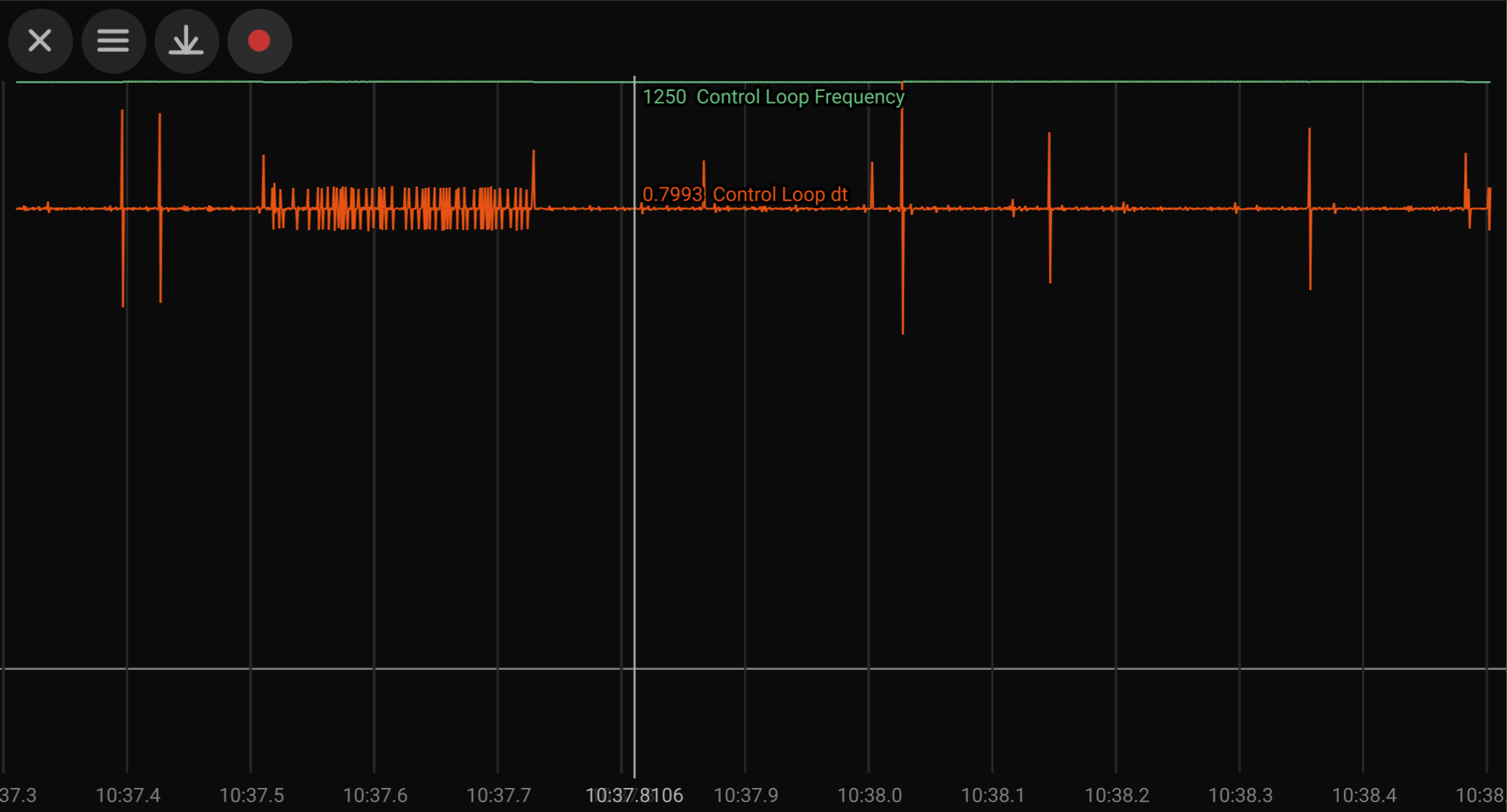
The combination of IMU Sample Rate 1200 Hz, bus speed 700 kHz and Motor ZVF 25kHz is the best that I’ve found so far for a very clean control loop timing. A disadvantage being the 25 kHz ZVF produces an audible high pitch noise.
A noisy dt does not necessarily mean it’s bad. The timing is partially compensated but low noise can only be better. I haven’t noticed any observable impact of having a noisy dt, any observations and feedback is welcome. You can play around with these values and see what you get.
Note on IMUs: You can find more info on the LSM6DS3 situation in the firmware link. For BMI160 upon a brief check, for configured 800 Hz the real frequency when engaged with ZVF 28 kHz is 500 Hz. You can inspect the data on your board and see what you find.
Known issues
- The board remote wheel turning in idle (either via an app or a remote) seems to now be glitchy, making weird noises. It’ll be fixed for the final release.
Download and changelog
Support the project
I invest a lot of time and energy into developing and testing of these improvements. If you would like to support Refloat development, here’s a few options to do so.