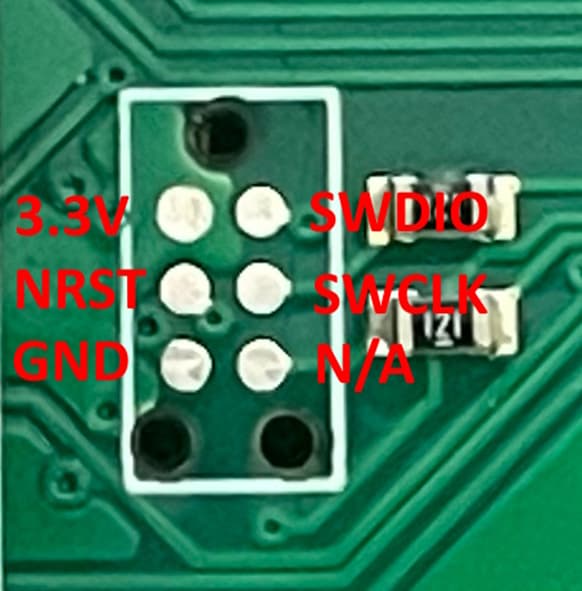
Anyone know the pinouts for flashing the Thor 300 after bricking? I see the 2x3 debug pad and was hopeful it was laid out like the LittleFOCer, but it does not appear to be.
I have reached to the fungineers, but no response yet.
I was updating the THOR300 to 6.06 from 6.02 and I guess I messed up. The VESC Express is still functional, but I can not get the THOR to appear anymore.
The order performed:
VESC Express
Bootloader
Thor
result → whoomp whoomp 
Sharing this to help anyone who finds themselves in a similar situation.
I got in touch with J from the Fungineers, who kindly provided the Serial Wire Debug (SWD) pinout for the Thor 300 ESC. The six debug pads are designed for use with a Tag-Connect TC2030-IDC-NL (or similar), but you can also solder temporary wires and use a ST-Link programmer, available on Amazon for under $10.
Here’s how the SWD pads map to the MCU:
• 3.3V (VDD) – PINs 19, 32, 48, 64 (Pin 1 is VBAT and has a different use case)
• NRST – PIN 7
• GND (VSS) – PINs 18, 63
• SWDIO (PA13) – PIN 46
• SWCLK (PA14) – PIN 49
I was able to identify what I did wrong. I followed the flashing instructions from the Fungineers website and their YouTube videos, but made a critical mistake: I saved the link to the latest firmware instead of downloading the actual .bin file. As a result, I flashed the VESC Express, then the bootloader, and then a text file containing the URL, rather than the firmware binary itself. This bricked the controller.
For addition firmware flashing instructions, I followed Surfdado’s YouTube video.
1 Like