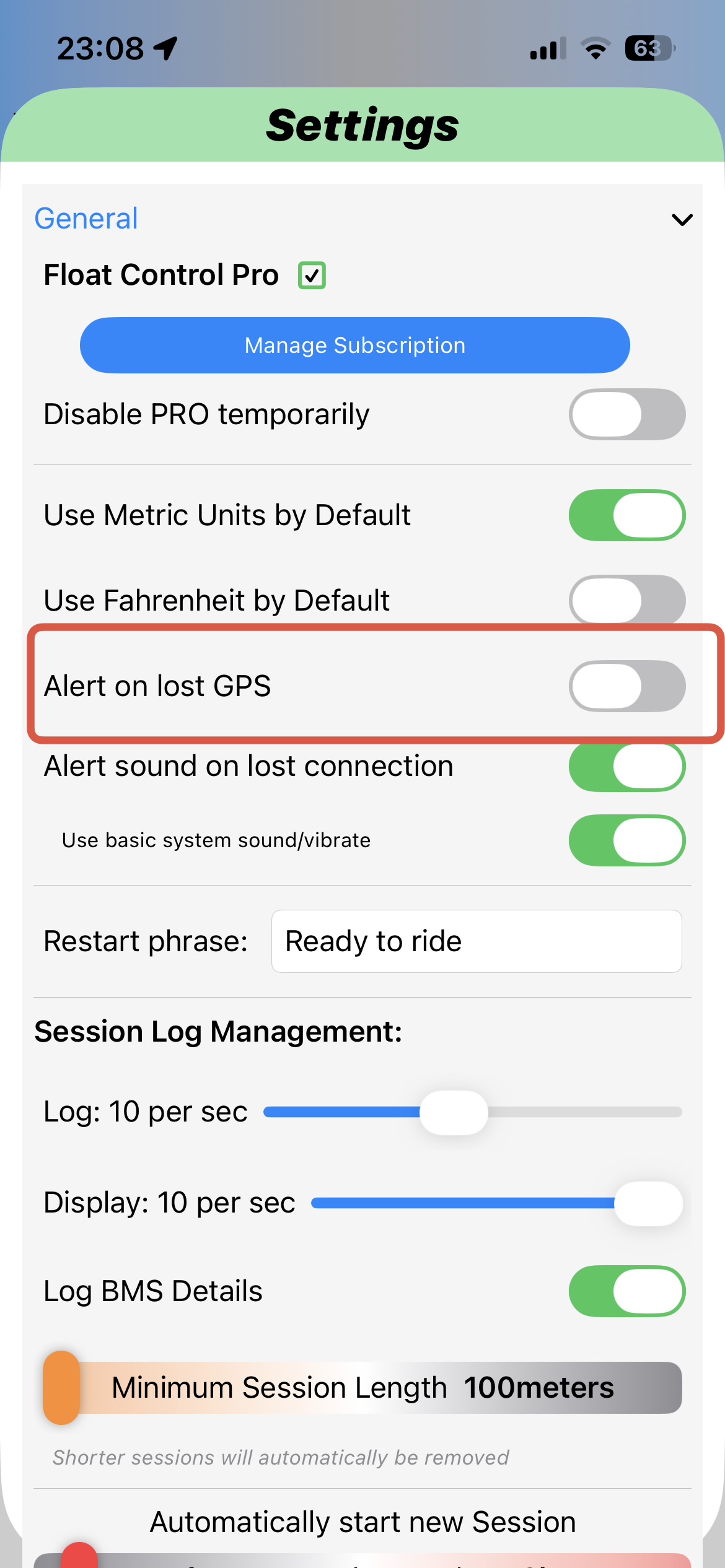
After updating Float Control (1/1//2026) I went for a ride and started receive a voice alert “GPS Signal not detected for 5 seconds,” or words to that effect. it happened maybe 30 times on a 16 mile ride. I looked several times in the settings to see if I could disable or mute the GPS alert (without disabling all other alerts), but could not find a specific GPS alert setting. I am running FC on the latest IOS version (Iphone 16 pro max)
I am not sure why the GPS signal was so sketchy and the ride map was reasonably accurate filling in the gaps.
Note: The following response has been generated by AI, so it may not be entirely accurate.
This is expected behavior after the latest Float Control update. A new GPS loss voice alert was introduced and it’s very sensitive on iOS. There is currently no way to disable only the GPS alert without disabling all voice alerts.
Short GPS drops caused by trees, buildings, tunnels, the screen turning off, iOS background activity limits, or the phone being in a pocket or backpack can trigger the alert repeatedly, even if the GPS loss is minimal and does not affect the ride.
At the moment, the only workarounds are allowing “Always” location access with precise location enabled, keeping the app in the foreground, avoiding Low Power Mode, or disabling voice alerts entirely. However, none of these fully solve the issue.
Ultimately, this would need to be addressed by the developer, for example by adding a dedicated toggle for the GPS alert or increasing the timeout threshold before the warning is triggered.